Tuesday, December 3, 2013

How To Add Facebook Like Box To Blogger Blog

Now Facebook is the best social communication site among all others.It help us to communicate with others easily and we may also know about all over the world within a second.We found many groups and pages in Facebook.These groups and pages helps us to know any news and updates easily.Every blog/website should have a Facebook pages.If blog owner shares his posts to Facebook besides blog,it will help his visitors to get updates easily.A Facebook fan page shows a blogs popularity.So every blog should have a Facebook fan page and a like box in his blog.In this post I'm going to share How To Add A Facebook Like Box To a Blogger.


Blog tips:Add facebook like box to your blog
Add caption

I think you already have a Facebook fan page of your blog and you have added  your blog adders in the page.So now you want to add a Facebook like box to your blogger.

How To Add Facebook Like Box To blogger


First of all go to this link:

  https://developers.facebook.com/docs/plugins/like-box-for-pages

 You will see this page


Blog tips:Add facebook like box to your blog

1.Give  your Facebook page URL

2.Select width and height (as u needed)

3.Select your color scheme

4.Last of all press Get Code

Then you will find a window like this picture (Given Below)


Blog tips:Add facebook like box to your blog

 1.Select IFRAME Then copy the codes


Then go to you Blogger Dashboard  an then go to Layout


Blog tips:Add facebook like box to your blog
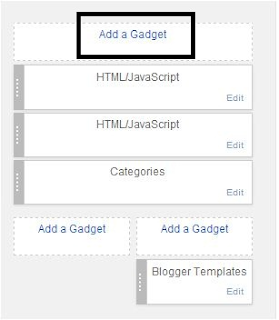
Select Add Gadget


Blog tips:Add facebook like box to your blog

Then select HTML/JAVASCRIPT


Blog tips:Add facebook like box to your blog

In the box paste your codes and press save button


Blog tips:Add facebook like box to your blog
 Save the codes
From Layout press Save arrangement button
You are almost done

Go to blog you will found a nice Facebook like box in your blog.If you face any problem then tell me.If this post helps you let me known by leaving a comment .

Sunday, December 1, 2013

Samsung Galaxy S2 I9100 Full Phone Specification

We know that now Samsung is in a top position.Samsung mobiles performance is really charming.Everyone feels proud to become a owner of samsung smartphone.Today i am describing about Samsung Galaxy S2.

All Features And Details Of Samsung Galaxy S2

Operating System:   Android v2.3.4 (Gingerbrand)  v4.0.4(Ice cream sandwich) Upgrade able  to 4.1(Jellybean)
Processor:  1.2GHz  Cortex A9
Ram:  1GB
Network:  2G- GSM  850/900/1800/1900
             3G-   HSDPA 850/900/1900/2100

Camera:  8 megapixel  (Auto flash, Led flash, Touch Focus, Face And Smile Detection)
             2Mp Front camera
Battery Performance: Li-Ion 1650 mah Battery
Stand By:               Up to  710h(2G)/ Up to 610 h (3G)
Talk Time:             Up to 18h 20 minute(2G) /Up to 8h 40 minute(3G)
Display Resulation     480x800 pixel
            Size             4.3 inch
           Type            Super Amoled  Plus capacitive touch Screen  16M colors  
Samsung Galaxy S2

Other features: 

Bluetooth:  Yes v3.0
EDGE:    Class12
Memory:16Gb/Support Up to 32GB
Java:     Yes
Gps:   Yes with A-GPS support
Multitouch: Yes
Radio:   Fm Radio with Rds
Usb:   Micro Usb2.0
WLAN:   Wi-Fi 802.11 a/b/g/n  dual band,WI-Fi Hotspot


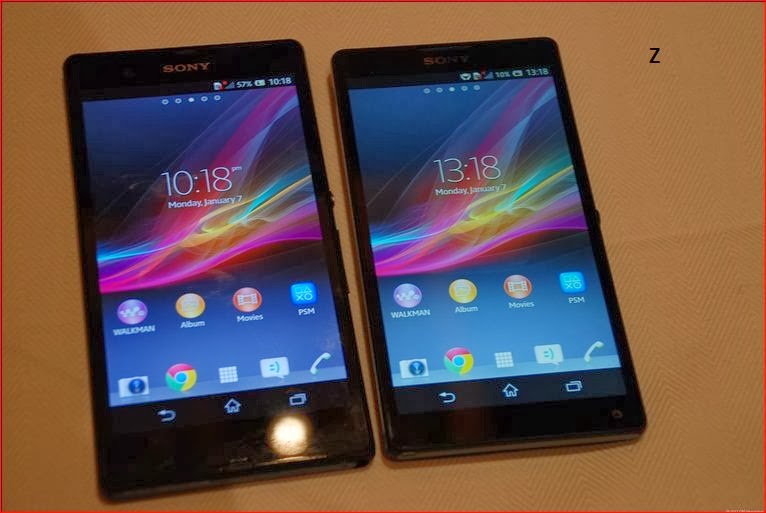
Sony Xperia Z- Full Phone Specification

Sony Xperia Z is the world sharpest smartphone with 5'' display.It has a very high pixel density-443 pixel per inch.It consists with the highest level of water resistance.Performance of this mobile is awesome.Some features enabled with this smartphone that i am describing shortly: Smart,sleek and durable/water-resistant/Though as metal/Dust-resistant/Better battery life/Entertainment audio and many more.

Reviews And Details of Sony Xperia- z

Feature:-
Operating System: Android os,v4.1.2(Jelly Bean),4.2.2(Jelly Bean) Planned upgrade to v4.4(kitkat)
Processor: Quad-core 1.5Ghz,2GB RAM
Sensor: Accelerometer ,Gyro,Compass,Proximity
Java:Yes
Colors:Black,White,Purple
Gps:Yes 
Fm Raadio:Yes
3.5mm Jack:Yes
Loud Speaker:Yes

Camera:-

Primary: 13.1 megapixel with auto focus and Led flash
Secondary:2.2 megapixel
www.alltricks24.blogspot.com
Sony XperiaZ

Battery:-

Stand by: Up to 550h(2G),Up to 530h(3G)
Talk Time:Up to 14h(2G),Up to 11h(3G) 
Music play:Up to 40h

Display:-

Type:TFT capacitive touchscreen
Size:1920 x 1080 pixel,5inch

Data:-

GPRS:Up to 107kbps
EdGE:Up to 296 kbps
Speed:HSPDA-42mbps, HSUPA-5.8mbps
WLAN:Wifi 802.11 a/b/g/n Wifi Hotspot

Memory:

Card slot:micro Sd up to 64 GB
Internal:16GB,2GB Ram

This smartphone is really awesome and i am suggest you to buy this phone if you want to be owner of this phone.

Monday, November 25, 2013

How To Increase Blog Traffic Easily 12+ Ideas For New Bloggers

Nowadays creating a blog is very easy task.Today's world many person has started blogging as their occupation.So every blogger are struggling to establish their blog on the web.If you don't get a lot of traffic in your blog you can not be succeed.If you want to earn from your blog you must have a lot of traffics in your blog.But increasing blog traffic is really hard.You must have to work hard.I am also a new blogger and i am
increasing my blog traffics day by day  .Today i am going to describe about to increase blog traffic.

Blog tips:how to increase website traffic quickly


Basically a new blog traffic increase slowly and it takes more time to get  a lot of traffic.So you have to be more strategic


Blog tips:how to increase website traffic quickly


Follow this steps to increase blog traffic:-


Write High Quality Unique Content Regularly(Don't Copy-Paste From Others):

Unique content is the best ways to increase visitors.if you want to get your blog in the first page of search engine then you have to write more unique content.Search engine always search for unique content and always avoid copy paste content.So try to write unique content.It will be better if you keep 500+ word in your each post.

Make Your Website/Blogs Loading Speed Faster:

Visitors wants to visit those website loads faster.If your website takes long time to load then visitors will press back button from your blog.To get high rank in search engine you must have fast loading speed in your blog.To make your website fast loading you should remove unnecessary gadgets/plug ins  and also keep 5/6 Post in your home Page and add READ MORE button in your blog.

Share Your Blog/Website In All Social Networks:

Now we can find many social networks in our surroundings.Many people are using these networks.So you have to connect your blogs In these social networks.Share your post in social networks and put a like/follow button of this social network in your blog.You can use Facebook,Twitter,Google+ etc.

Comment Others Blog:

It is a great idea to increase back links.Always comment on others blog post and keep your blog address there.Then others will find your blog easily and you will get more traffics.But be aware of spamming.And always reply your own blog comments quickly.

Design Your Blog Professionally:

Good design is the main attraction of a blog.Design your blog nicely.Try to make combination between contents color an templates so that visitors can easily read the posts.Choose a good and professional template for your blog.

Add Related Post Option In Blog Posts:

Mainly visitor's find out your blog in search engines and they read only one post that they searched.But if you want that your visitor will visit your blog more times then you keep a related post links in each post.So that visitors will visit other posts of your blog.

Use Relevant Photos In Each  Posts:

If you use relevant photos with posts then your posts will looks professional and nice decorated.It will also help visitors to understand what you means by the post.Sometimes we looks for photos in search engines and we often visit the website where those  photo was posted.So i think it will help you to get more visitors.

Use Image Alt Tags:

Use image alt tags in all image.Now visitors search image in Google.If you use image alt tags in all photos it will help you to get high rank.And if anyone choose your photo he may be visit your blog for more photos and photo related article.

By Joining Forum:

Join popular forum sites and answer others question but don't give your blog link directly just provide it with signature.It will help you to get more traffic and high rank in search engine.Try to give high quality answer.If anyone likes your answer he/she will visit your blog.

Check Your Crammer And Spelling Mistakes:

 This is a very important task to get visitors.If visitors don't understand your voice then they will leave your blog.So make easy your posts and check your posts spelling.Don't keep any mistakes in spellings and try to make easy your language.

Make Your Blog  In English:

 If you want to get worldwide visitor then you must make your blog in English because English is an international language.If you make blog in your own language then only a few people will visit your blog.Try it from today.

Always Be Helpful To Your Visitors:

 You should answer your blog comments as early as possible.If you do this your visitors will be happy and they will keep visiting your blog regularly for more help.So be helpful to visitors.

Finally:

Follow this tips step by step.Never lose your hope.If you do hard work you will be succeed.Nothing can stop you.


Friday, November 22, 2013

How To Change Default Template In A Blogger Blog

Hello Visitors.Hope you are all well.Today I am going to share another tips for your blog.In my previous post i told how to add read more in blogger blog posts.Today i am going to show how you can change your template in your blog.Template is the main attraction of your
blog.A blog looks nice decorated and more professional if you add a best template.Visitors also like nice templates.They feel comfortable if your blog has a nice template,and if your blog is nicely decorated.However you can download a template from anywhere of Internet.

 To change a template you have to follow these rules:

1.First Go to your Blogger Dashboard and click on Template.
2.Then click on Backup/Restore(see in image) You can download your previous template as backup.

Blog tips: change default template in blogger
Change template
3.Then browse your selected Template from your computer.(Your templates format must be XML otherwise your blogger blog will not support template)


Blog tips: change default template in blogger
Change template
4.Then click on upload button.You are almost done.Now view your blog
If you want to edit or change your template by html code then you click on "Edit html" button.Then select all and paste your new codes on previous codes and save it.
If you face any problem then tell me,I will help you.Good by everyone.
 

Thursday, November 21, 2013

How To Add Read More Button In Your Blogger Blog posts

Hello Visitors.Hope you are all well.Today I am going to share another tips for your blog.Following this steps you can easily add read more button in your Blogger blog.

Read more button is very important for you blog.It helps to increase your blog loading speed.And it also helps you to put more posts on home page than before.Anyway i know every wants to use this button.If you use any third party template then read more button added automatically.But in a blogger blogs default template you have too add this button  manually.Anyway its very easy.Now just follow my steps to add this button.

You Have To Follow These Rules:-
Blog Tips: Add read more button in your blog
Read more
How To Add Read More Button In Your Blogger  Blog posts:-
 
1.First Go to your Blogger Dashboard  and write a post.You can add this to your post that you have written before,For this you have to edit that post.

2.Now go to your post.Select the line you want to add  read more(EX: I have selected after 6 lines)

Blog Tips: Add read more button in your blog


3.Then click on "Insert Jump Break"(See Screenshot)

4.You are almost done.Publish your post.Look there You will find a read more button after 5 lines.

If you face any problem then tell me,I will help you.

You can also see this post: How To Change Template In A Blog

Friday, July 12, 2013

How To Create A Folder Without Name

Hello visitors I hope everyone is well.Today i am giving another amazing tips.It may be  a surprise to you How it Possible?And yes, it is possible.That those who are new to this may be surprised.But it is very simple and very easy to do.
How to create a folder without name:

 
1. Create a folder.
2.Name the folder by holding alt and press 0160.

3.That means you go to rename option and select the name of the folder,when it is
showing blue color (see the picture given below) then just press and hold  Alt and then press  0160 from keyboard ( holding Alt,press 0160)                                          
                              
Tips:make a folder without name
Now see

Now See  the folder has been created without name. How much fun is not it? Please share it with others, they may be surprised.